SCV (special characters view) layouts on N900: Difference between revisions
No edit summary |
No edit summary |
||
| Line 13: | Line 13: | ||
<video src="http://video.gdeq.net/GDEq-lec-20161130.mp4" controls style="width:'425'px;height:'350'px"></video> | <video src="http://video.gdeq.net/GDEq-lec-20161130.mp4" controls style="width:'425'px;height:'350'px"></video><p style="font-size:80%;padding:0;margin:0;">(Right click to control movie)</p> | ||
[[Category: Maemo5 for Nokia N900]] | [[Category: Maemo5 for Nokia N900]] | ||
Revision as of 14:54, 4 June 2018
The SCV is the symbol table that appears when pressing blue "Sym" key on the slide keyboard of the N900. The SCV layouts are defined in the *.vkb files located in /usr/share/scv_layouts/ on the device. This archive contains the directory /usr/share/scv_layouts/ as it was distributed inside Nokia N900 firmware PR 1.3 version 20.2010.36-2 Global.
File Ru_vkb.zip contains my customized file ru.vkb with the following layout (the base and shifted):
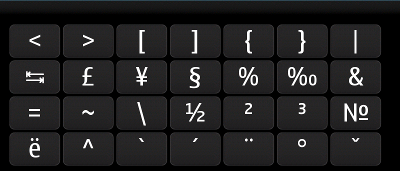
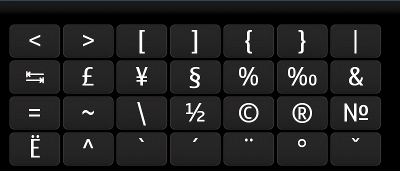
Keys ` ´ ¨ ° ˇ and ~ ^ in the shifted layout are dead keys.
Note that in the original file ru.vkb the Cyrillic letters ё (U+0451) and Ё (U+0401) are substituted by Latin letters with diaereses U+00EB and U+00CB. In the customized file this bug is fixed.
<video src="http://video.gdeq.net/GDEq-lec-20161130.mp4" controls style="width:'425'px;height:'350'px"></video>
(Right click to control movie)